Overview of Meraki Workflows

A newer feature that came out for Meraki is Meraki Workflows. Creative name. This new feature within the Meraki Dashboard provides you with a low code or no code method to perform your day-to-day tasks. This is not locked to only the Meraki Dashboard. You can set targets that can point to different endpoints within your environment that are not locked to the Meraki Dashbord. I will be creating example workflows through this blog or Youtube depending on the complexity of the use-case. This is a new feature that was introduced into Meraki to help organizations
You can access the workflows via the Automation Radio button on the left-side of your screen as below.
Each of the navigation windows items below (captured Nov 2025) are noted in the bullets below
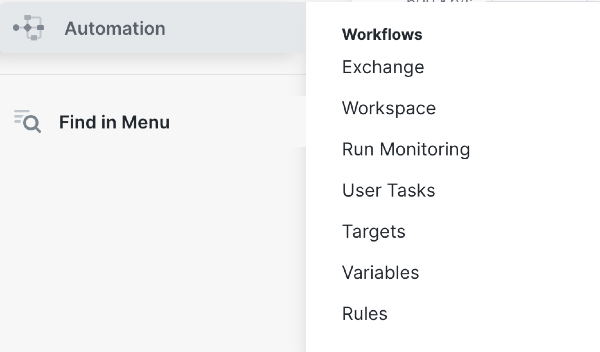
- Exchange: This will link you to a page that will have Cisco Managed, Community built workflows that you can install. You will be able to utilize this page to check on Cisco-Managed Workflows. Also, there will be a page that you can see community-based workflows that you can install and then customize as sort of a template in your workflow
- Workspace: Location you can see your installed workflows. You can edit your workflows to add additional conditionals, loops and clauses. You can also create your custom workflows within this view if their wasn't workflows that you wanted in the Exchange. You can see below as an example of validated workflows or workflows that you created by yourself
- Inside of upcoming blogposts i'll be creating example csutom workflows that you could use/follow, so that you can create something by yourself with the low code/no code workflow

- Run Monitoring: It's pretty self explantory , but this is the location that you can see failed workflows or successful workflows. This will give you can overview as well if there are current workflows that are being run
- User Tasks: This is the location where you can input user prompts that will require approval. User Tasks will allowy ou to make a multi-step workflow that requires a second person to approve it before it progresses. You can think of this as a git pull where you require approval before the workflow is performed within the organization
- Targets: You are able to point workflows to different endpoints as targets as part of your workflow. Examples would be a HTTP Endpoint, SMTP Endpoint, FMC, ISE, Ansible and Terraform endpoints. You can use workflows to kick off a multi-step process that can integrate non-Meraki equipment
- Variables: Variables that you could use to insert into workflows depending on the use-case. This is very similar to Postman as part variables that you can use it depending on either Global or Enviromental
- Rules: Automation rules that you can insert into your workflow that you need an expected output before the workflow can continue. I would think of this as a gatekeeper that you can add within your workflow as a catch.